 Roger Hosto
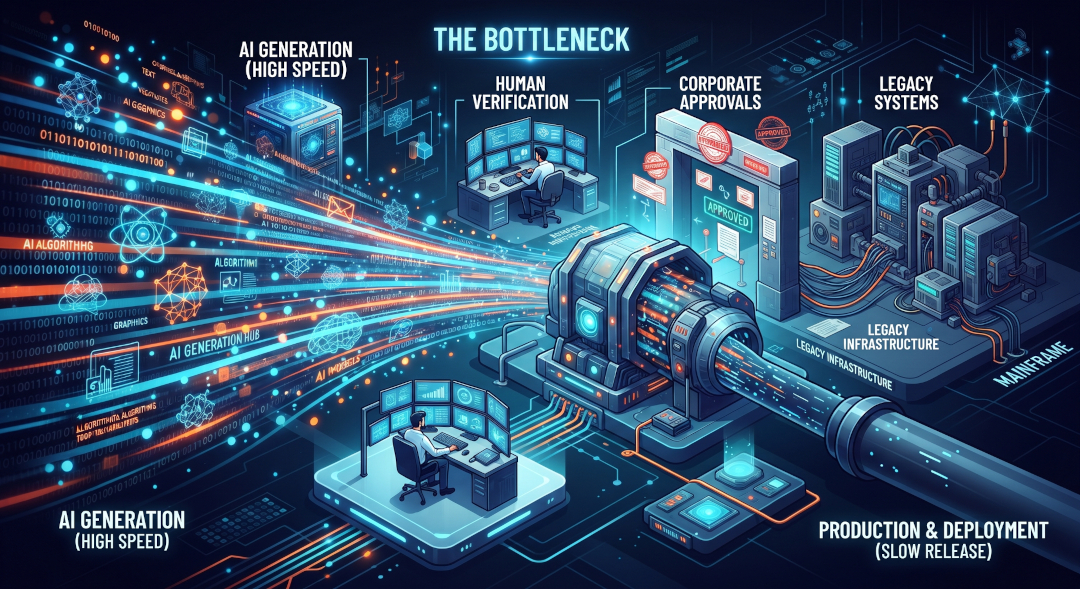
Over the weekend, I worked on a couple of personal projects and used AI to help. I had Claude debug some code, Gemini doing deep research on another pet project, and I sat there watching tokens tick away. I had a random thought about how quickly AI was improving and what is actually slowing it down. What are the key bottlenecks we are facing? That got me thinking about Amdahl's law, which is a computer science formula that predicts the maximum theoretical speedup of a task when part of the system or program is improved or run in parallel. And since AI does a lot of things in parallel, it will see slowdowns, but where?
Like any good AI engineer, I asked AI, and what it came back with wasn’t quite what I expected, but it was very interesting. I assumed it would point to hardware and power bottlenecks, but one problem piqued my interest.
Here’s what AI said.
The Math: Amdahl's Law (AI)
To understand how rapidly AI should grow before stalling, we have to look at the physical and mathematical constraints of the systems driving it.
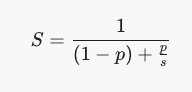
Amdahl's Law is the silent bottleneck of infinite scaling. It states that the theoretical speedup of a system is strictly limited by its sequential (non-parallelizable) fraction:
My Thoughts at this Point (Author).
While Hardware, Data, and Power bottlenecks didn’t surprise me, what caught my attention was “The Workflow Bottleneck. ”, and it takes the human factor into account, which admittedly I wasn’t really thinking about. The hints of the Pareto principle (a.k.a. the 20/80 rule) also caught my attention, as I have seen it show up so many times in the past. Of course, I asked it to expand on “The Workflow Bottleneck.”
The Workflow Bottleneck (AI)
The Workflow Bottleneck occurs when organizations apply Amdahl’s Law to human-machine operations. While AI drastically accelerates discrete tasks (like writing code or summarizing text), it exposes the rigid, sequential human processes that surround them.
The Mathematical Limit of Task Acceleration
Amdahl’s Law calculates the overall speedup (S) of a system when only a portion (p) of it is improved by a factor of s:
When applied to enterprise workflows:
- p (Parallelizable/Automated Fraction): The portion of the process AI handles (e.g., writing initial draft code, generating reports, parsing documents).
- 1 - p (Sequential Fraction): The non-automated human activities (e.g., code reviews, security audits, business approvals, cross-departmental alignment).
Example: The 20/80 Rule
If AI accelerates draft generation (p = 0.20) by a factor of 100 (s = 100), the resulting total speedup is surprisingly low:

Even if AI speedup approaches infinity (s → infinity), the maximum system speedup is capped at 1 / 0.80 = 1.25\times (a 25% overall gain). The remaining 80% of the timeline dictates overall productivity.
Key Drivers of Workflow Friction (1-p)
The non-automated fraction (1-p) remains bound by three primary enterprise constraints:
- Verification Latency: AI outputs often require rigorous human verification to prevent hallucinations, security vulnerabilities, or compliance breaches. If reviewing AI-generated code takes nearly as long as writing it from scratch, p remains small.
- Organizational Asynchrony: Waiting for stakeholder sign-off, legal review, or cross-functional consensus introduces idle time that AI speed cannot eliminate.
- Legacy Systems and Data Integration: Moving outputs from an AI interface into production databases or legacy infrastructure requires manual data entry or complex validation, creating integration friction.
Break down the friction (Author).
Verification Latency
My favorite phrase lately is “AI Slop”; it ranks up there with TL; DR. I hear it 2-3 times a day. I think this is funny because of the Love/Hate relationship technology people have with documentation. We love it when we need it and complain when we don’t have it, but will surely go out of our way to avoid writing it.
A lot of people, including myself, are overcompensating for years of no documentation, or for what was really just cliff notes that make sense to no one but you. Now, however, we can generate pages of documentation with a 140-character prompt.
The problem is one of two things, or both: now you have to read all of it, which is boring because you already know what it does, or so you think you do; or worse, you find you don’t understand it, or it’s missing something, so now you have to fix it or learn it. The second, people reading it see five pages of clearly AI-generated documentation because everyone knows you wrote your last design documents on the back of a Starbucks napkin. Now here is where my second favorite phrase comes in: TL; DR, or worse. It's AI slop you can’t understand, and that only slightly makes sense to you. You're left defending something you're not even sure about.
However, don’t panic; this has already started to be addressed; it's a matter of fine-tuning and training people to change how they think. I already cover some of this in another post about using AI as a Thinking Partner, which is what I did here, because math is hard.
But I've found several other tools that help me solve some of these problems. Here’s what I use to help with AI Slop and TL;DR. This may not work for everyone, but they work for me.
Create an AI persona to act as a reviewer, give it the document to review, and make sure that it asks for any clarifications. I would normally do this with different AIs; for example, I'd have Claude help write it and have Gemini take on an expert persona to review it.
Next, I put it into a screen reader to read aloud. I have found that I catch things I normally wouldn’t, and regular listeners average between 300 and 450 words per minute (wpm), while beginners typically start closer to 150 wpm. The average page is ~500 words, so it only takes 1.25 to 2.5 minutes per page.
Finally, keep it simple and add everything to an AI Project; share it with your team. Here are some examples of AI Project sharing:
- Claude Projects: Sharing lets users on Team and Enterprise plans collaborate in shared workspaces by pooling custom instructions, uploaded knowledge files, and team chats.
- Gemini NotebookLM: If your goal is to upload a massive amount of shared project documents to research, summarize, and collaborate on, Google's standalone tool NotebookLM is an incredibly powerful, research-focused workspace built for this.
- Microsoft’s Copilot Cowork: For collaborative project execution across teams, Microsoft also features Copilot Cowork. Interestingly, Microsoft partnered with Anthropic to integrate Claude's agentic technology directly into this system, allowing team-wide tracking of project briefings, files, and tasks.
Using it feels like having a shared brain. If you're all working on the same page, it's easier to find the information you need, and if you need clarification or a deep dive, you can ask the agent. It may also have insight you missed from the last meeting you didn’t attend because of that dentist appointment. This is great because you don’t have to dig through SharePoint, Confluence, Google Docs, emails, and meeting notes. To find what you are looking for, you just ask AI.
Organizational Asynchrony
One of my favorite quotes is Mark Twain's "Don't use a five-dollar word when a fifty-cent word will do." We like the five-dollar word because it makes us feel smarter, just like we like complicated processes. Most companies go one way: they either have no process at all, or they have one so complicated it makes no sense to anyone, so people work around it or bypass it completely. By nature, people seek perfection, which leads to overcomplicated processes.
This is where you start using AI to help craft, improve, and simplify your processes and policies. To support this, put it in a Project, Gem, or whatever you prefer. Once that's in place, you can create AI Skills to verify that processes and policies are being followed; if anything fails, it gets flagged and routed for human review. This is where using AI as a thinking partner is important.
You can also develop skills to help users follow the process by automating tasks and working with them to fill in gaps they may miss. This helps reduce much of the back-and-forth that processes can introduce.
Legacy Systems and Data Integration
Integrating AI with legacy systems is one of the biggest challenges enterprises face. The risks aren't just technical—there are also newsworthy mishaps, like the infamous "AI deletes company database" stories, which highlight the real potential dangers of poorly managed automation. It’s not as simple as plugging in a modern control program (MCP) and hoping it all just works.
So how do you address these legacy integration bottlenecks and actually make progress?
1. Standardize Data Formats: Adopting standardized data formats and robust validation layers ensures that AI-generated outputs are immediately compatible with legacy systems. This reduces manual data entry, lowers errors, and enables safer, more predictable automation.
2. Implement Middleware Solutions: Middleware and API gateways can act as translators between modern AI tools and older infrastructure. By introducing a layer that handles protocol conversion, validation, and security, you enable seamless communication while protecting mission-critical data.
3. Automate Data Pipelines: Whenever possible, automate the movement of AI outputs into production systems. Secure, well-monitored pipelines reduce the risk of human error, eliminate tedious manual transfers, and speed delivery while maintaining oversight.
By tackling these areas, organizations can bridge the gap between cutting-edge AI and the legacy systems that still run much of the business world, unlocking value without compromising safety or compliance.